The catalog
buyers actually
want to use.
Sell is what your dispensary buyers see when they ask "what do you have?" — a live, visual, chemistry-rich catalog that loads in their browser, scans like a high-end menu, and turns a quote request into three taps and a Submit button.
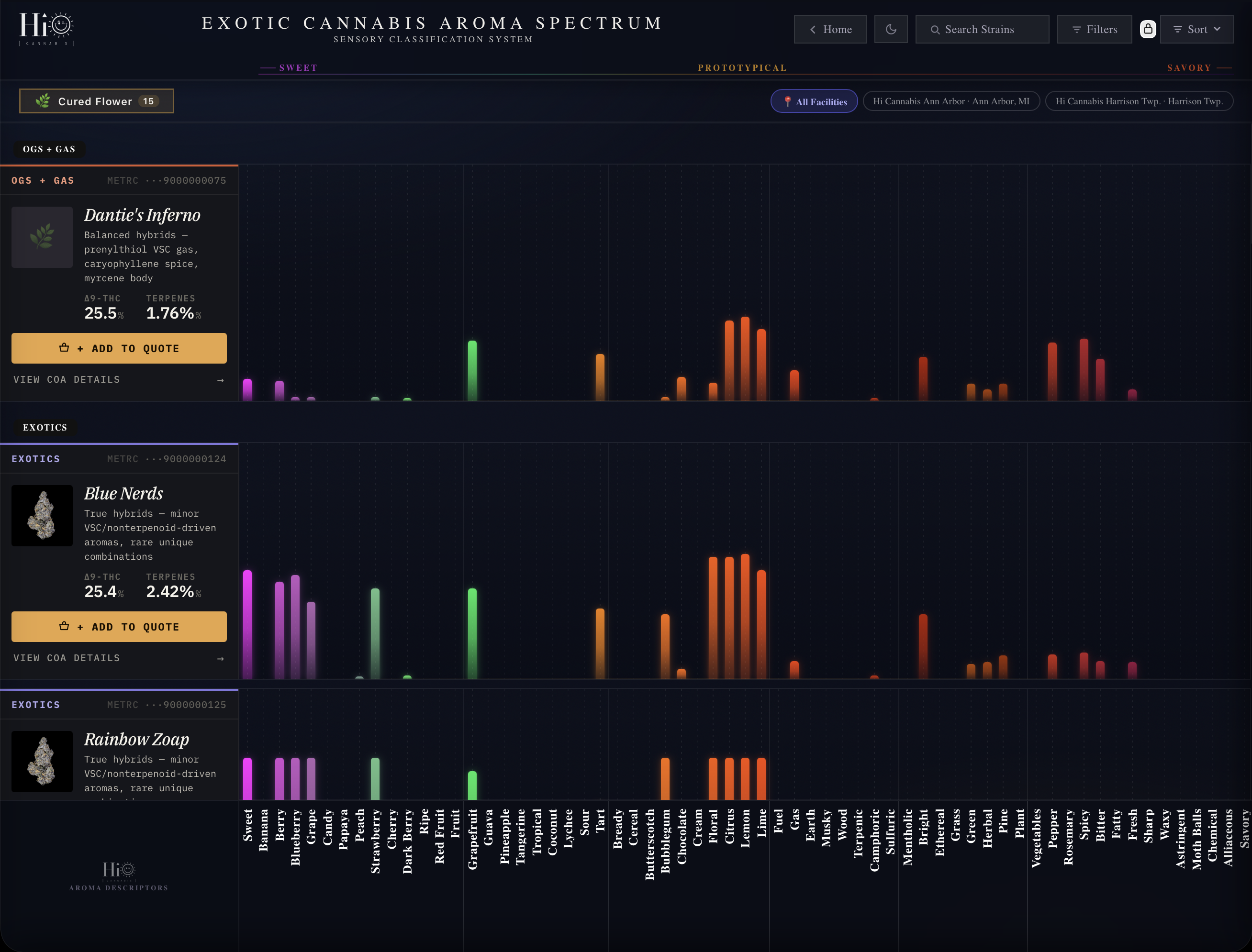
The Aroma Spectrum maps every cultivar across SWEET → PROTOTYPICAL → SAVORY, with color-coded bars per descriptor. Click any bar to see the responsible compounds, peer-reviewed, with thresholds. Click any cultivar to drill into the full terpene report, cannabinoid breakdown, and QA panel. The chemistry is the catalog.
Buyers don't read spreadsheets.
They scan menus.
The buyer's question is *"what do you have"* — and 80% of cannabis menus answer it with cultivar, THC, $/lb in three columns of plain text. Same answer everyone else gives. No reason to choose you.
A spreadsheet no buyer reads twice.
You attach menu-Q2.xlsx. Three columns. Cultivar, THC, price. The buyer opens it on their phone, squints, asks "got anything around 26%?", you reply with five names, they pick one based on price. Your batch chemistry, your panel scores, your safety panel — none of it makes it into the conversation.
The buyer chooses on price because price is what the menu showed them. You priced the work. You didn't sell the work.
- No chemistry visible — terpenes, panel scores, safety data all hidden
- No browse experience — text columns, no visual at-a-glance comparison
- Quote = email thread — back-and-forth, no per-grade pricing structure
- Same as everyone else — the spreadsheet doesn't tell your story
A live, visual, chemistry-first menu.
You send the buyer a link. Your branded catalog loads in their browser — your colors, your name, your cultivars. They see the Aroma Spectrum at a glance, scroll through 50+ descriptors, click a bar to see the compound responsible, click the cultivar to see the full terpene report. They're inside your operation, not your spreadsheet.
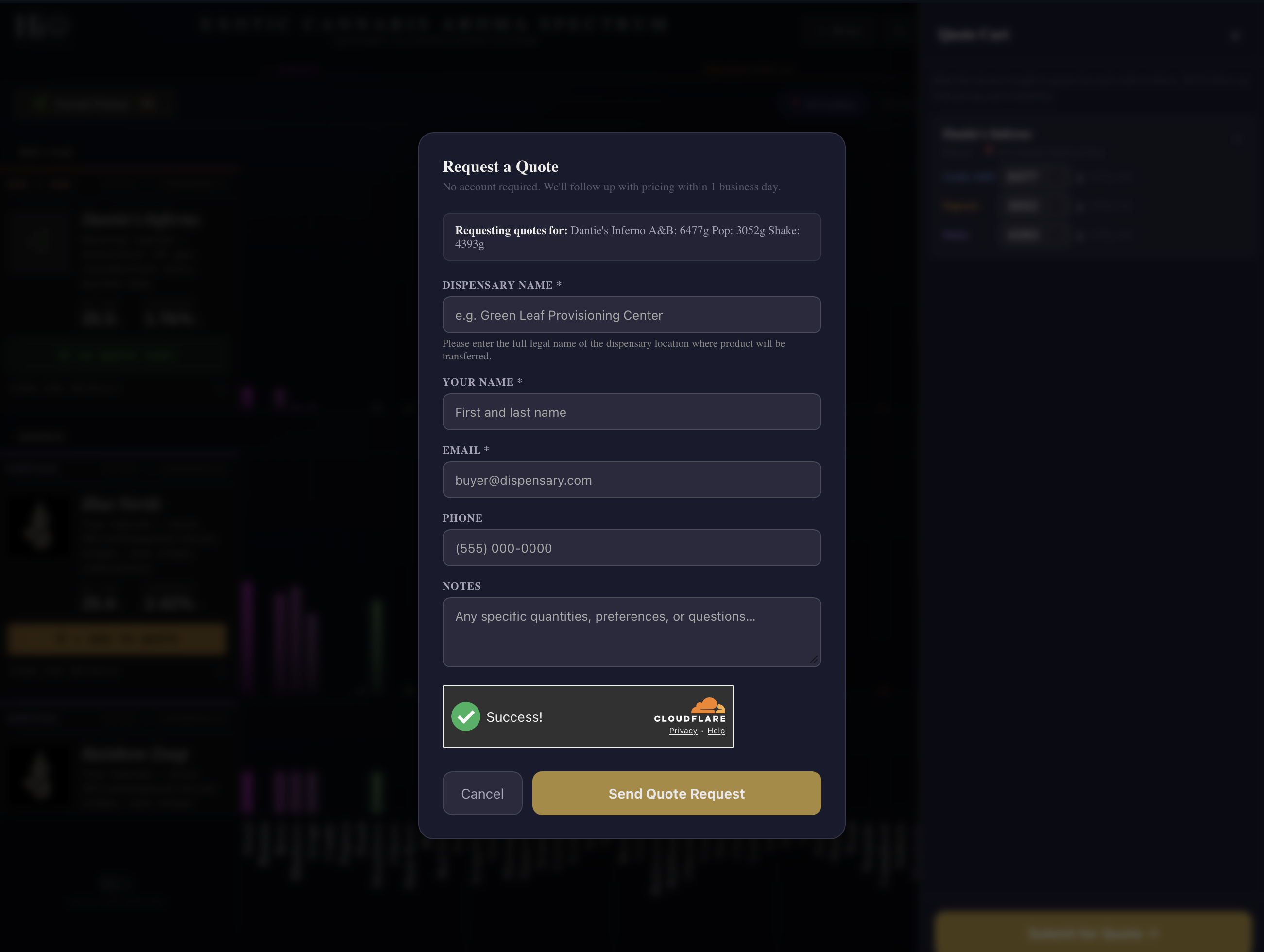
When they're ready, the per-grade quote cart slides in. Three grams fields. Three taps. Submit. No login. No PDF. The quote lands in your /SALES pipeline as Pending — within seconds.
- Branded for your operation — your logo, your colors, your domain
- Aroma Spectrum at-a-glance — 50+ descriptors, color-coded, instant comparison
- Click-to-chemistry — every bar opens the responsible compounds
- Per-grade quote cart — A&B, Popcorn, Shake — submit in three taps
- No-account submit — Cloudflare Turnstile bot protection, no friction
Four engines. One catalog.
From the moment a buyer lands on your link to the moment their quote hits your pipeline. Aroma Spectrum, compound tooltips, per-grade cart, no-account submit. Every part of the buying experience, on one canvas.
Every cultivar, mapped. SWEET to SAVORY.
The Aroma Spectrum is the buyer's first impression — and it's already different from anything else they've seen. Every cultivar gets a row. Every aroma descriptor gets a column. Color-coded bars show intensity per descriptor. The whole picture loads in a single scroll.
The axis runs SWEET → PROTOTYPICAL → SAVORY, with 50+ descriptors arranged left-to-right by aromatic family. Berry, candy, citrus, floral, herbal, woody, gas, garlic — wherever your cultivar lands, the bar pattern tells the story before the buyer reads a single word.
- 50+ aroma descriptors — sweet, fruit, citrus, floral, herbal, woody, gas, savory
- Color-coded by family — pink/magenta for sweets, green for herbal, amber for gas, red for savory
- Sortable + filterable — by class, facility, THC range, terpene profile
- Multi-facility filter — all sites or one — buyers know where it was grown
- Live stock indicator — buyers only see what's actually available right now
Click a bar. Click a cultivar. See the chemistry.
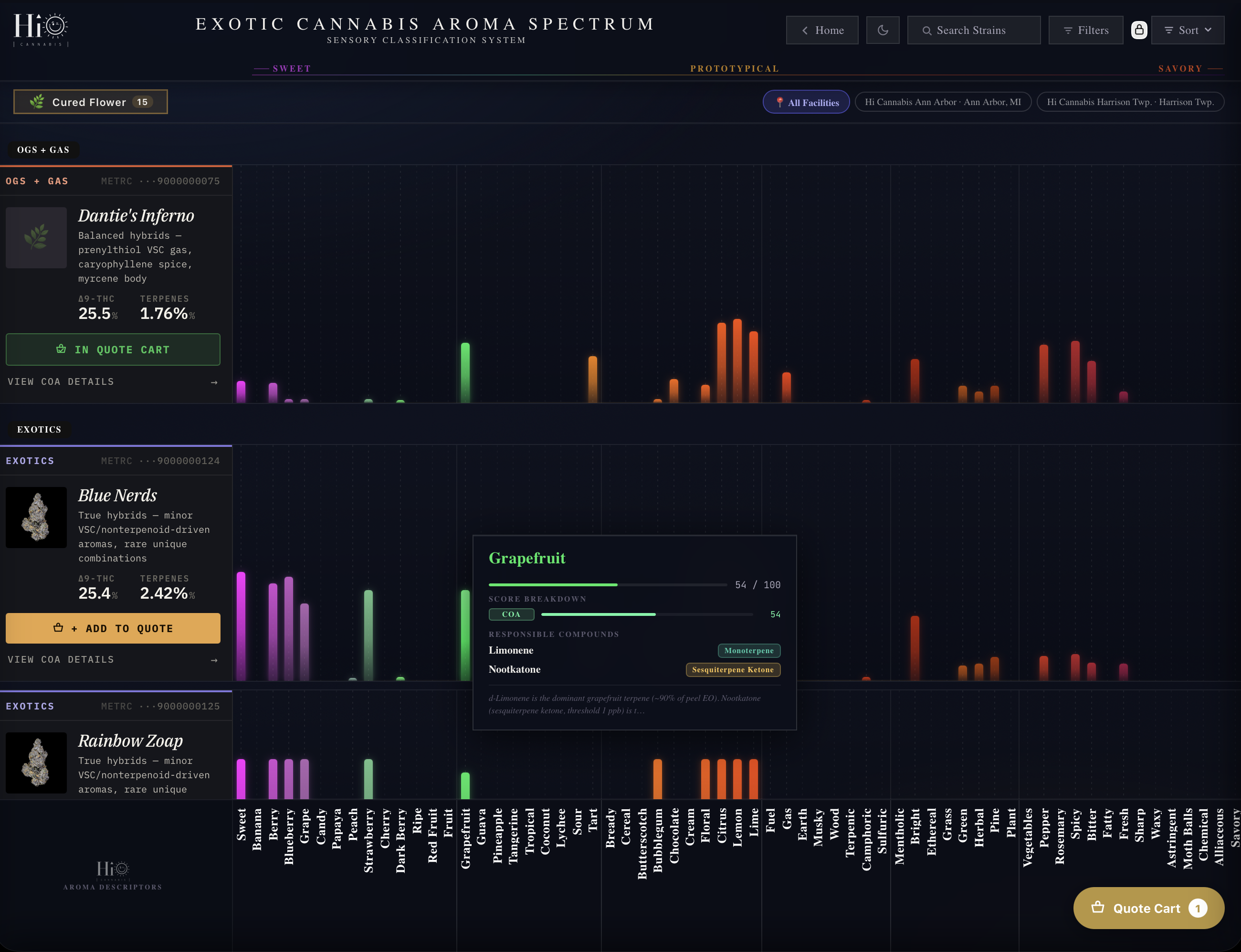
Every aroma bar on the Spectrum is interactive. Click Grapefruit on a Blue Nerds bar and a tooltip pops with the score breakdown, the responsible compounds (Limonene as monoterpene, Nootkatone as sesquiterpene ketone), and a peer-reviewed citation. The buyer is reading the actual chemistry behind the note, not a marketing description.
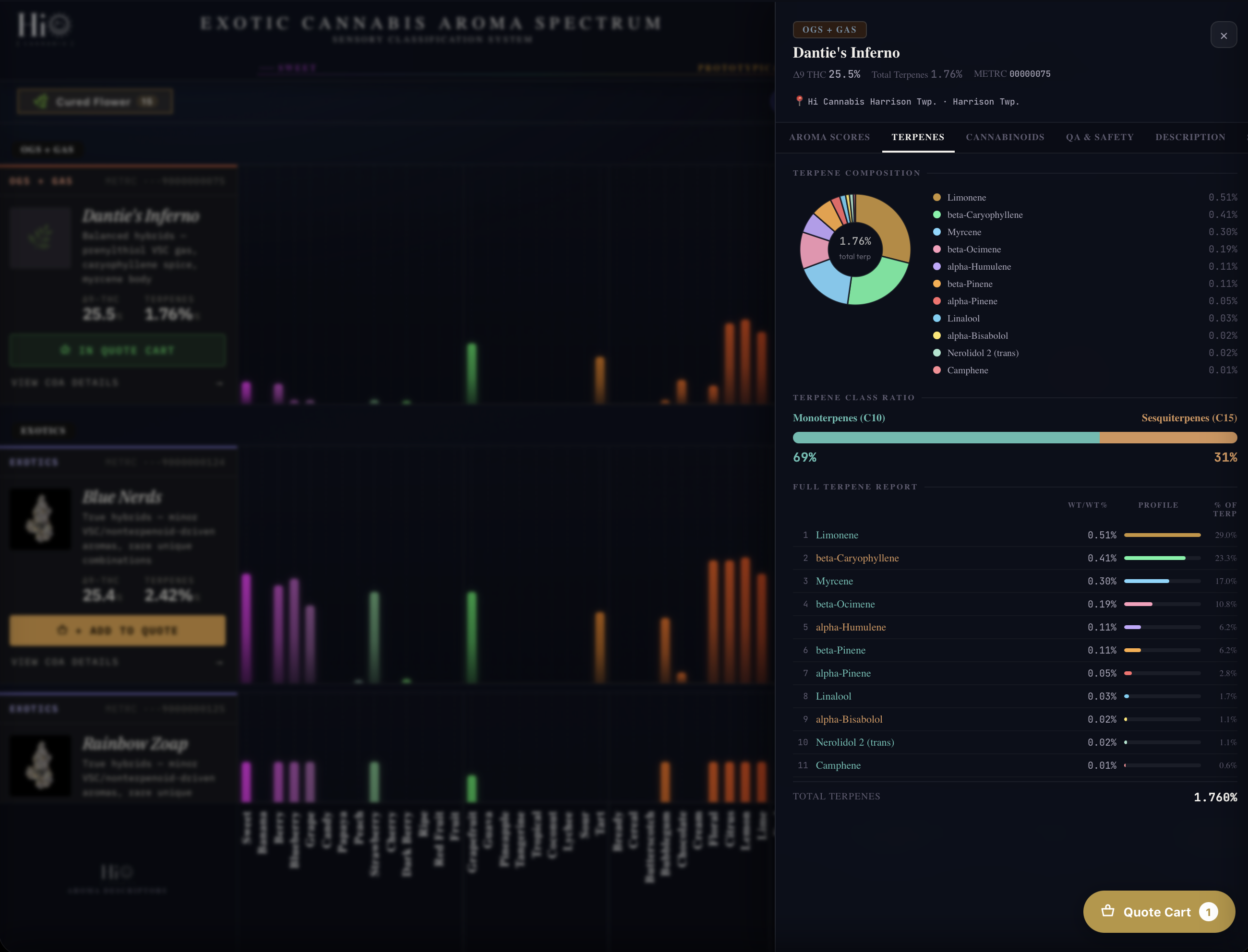
Click the cultivar itself and the full detail panel slides in: Aroma Scores, Terpenes, Cannabinoids, QA & Safety, Description. Pie chart of terpene composition. Monoterpene-to-sesquiterpene ratio bar. Full 11+ compound report ranked by weight. Water activity, METRC ID, test date, every safety value. The buyer sees more chemistry than your COA PDF would show them.
- Compound tooltips — click any aroma bar, see the responsible terpenes/VSCs/esters
- Peer-reviewed citations — every compound annotated with science, not marketing
- 5-tab cultivar detail — Aroma · Terpenes · Cannabinoids · QA & Safety · Description
- Terpene pie chart + monoterpene/sesquiterpene ratio bar
- Full chemistry transparency — buyers see what no other menu shows them
Three grams fields. Three taps. No account.
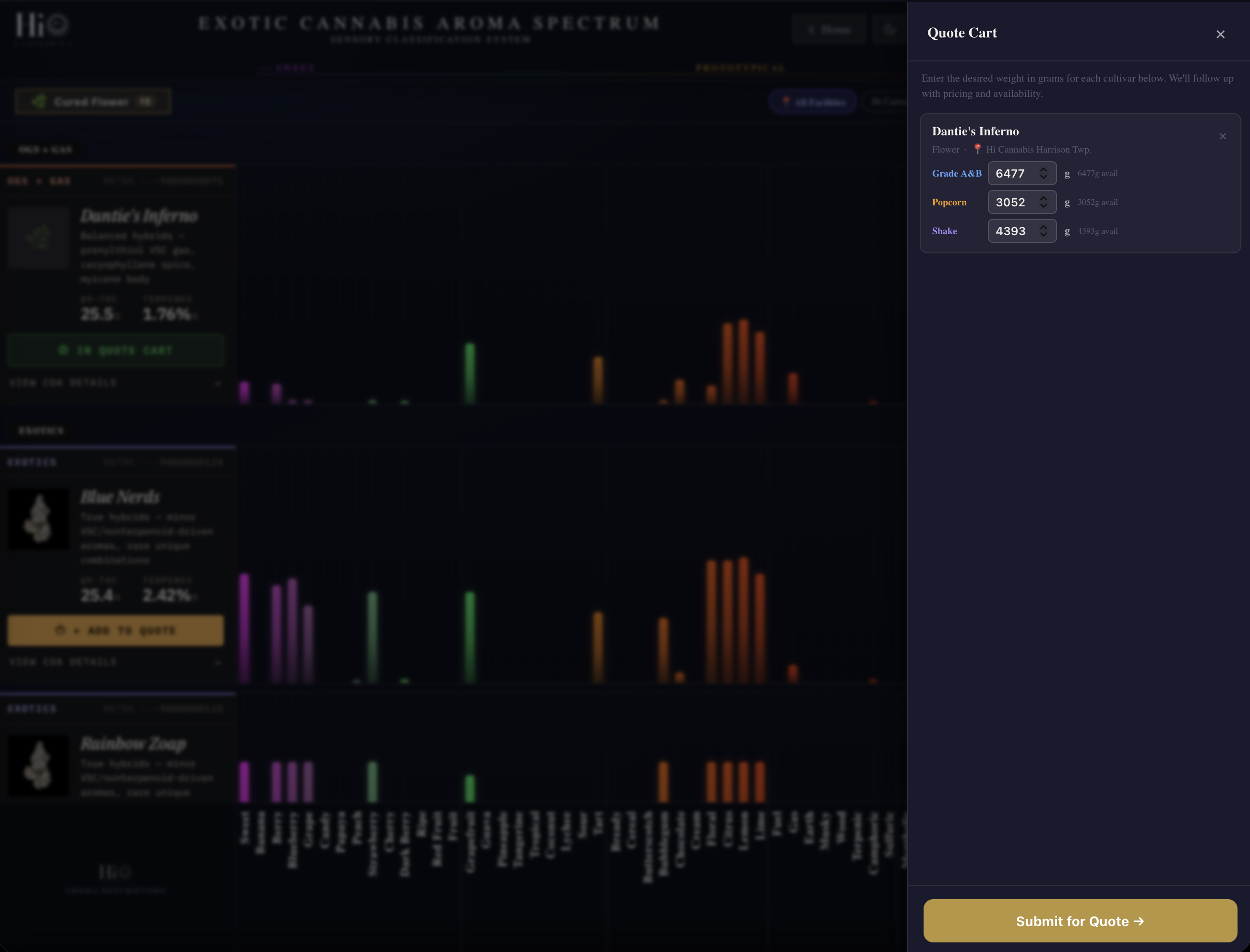
When the buyer's ready to quote, they tap Add to Quote on any cultivar. The cart drawer slides in with three editable fields: Grade A&B, Popcorn, Shake. Each field shows what's actually available. Buyer types the grams they want. Repeat for each cultivar. Submit.
The quote form asks five things: dispensary name, contact name, email, phone, optional notes. Cloudflare Turnstile handles bot protection without making the buyer solve a CAPTCHA. No login. No password. No friction. The quote hits your /SALES pipeline as Pending within seconds, with a notification email to your team.
- Per-grade fields — A&B, Popcorn, Shake — tracked separately on every line
- Live availability — each field shows what's currently in stock
- Multi-cultivar cart — bundle as many cultivars as the buyer wants
- Cloudflare Turnstile — invisible bot protection, no CAPTCHA puzzle
- Lands in /SALES Pending — your team gets notified, the pipeline starts
Your brand on top. Cannvas underneath.
Sell isn't a Cannvas marketplace. Buyers never land on a Cannvas-branded page. Your logo, your colors, your domain — buyers experience the catalog as your operation, not someone else's platform.
Run on yourbrand.cannvas.app by default, or wire up a custom domain so buyers visit wholesale.yourbrand.com with no Cannvas reference visible. The "Powered by Cannvas" appears once, in the footer, in fine print. The catalog belongs to you.
- Custom subdomain — yourbrand.cannvas.app default, or wire up your own
- Logo + color theming — your visual identity, not Cannvas's
- Co-branded emails — quote responses sent from your domain
- "Powered by Cannvas" — fine print only, never in the headline
- Permanent home-screen install — buyers can install your catalog as a PWA
See it run. Buyer link click to quote sent.
A guided tour through the Sell catalog from the buyer's perspective — land on the spectrum, browse, click an aroma bar to see the compound, open the cultivar detail panel, add three cultivars to the quote cart with per-grade quantities, fill out the no-account form, hit submit. Real Cannvas. Real cultivars. Real flow. Scroll-controlled, no sign-in required.
Sell is what the buyer sees. The other canvases are what makes it possible.
Every cultivar, every batch, every gram.
Every aroma bar on the Spectrum, every compound in the tooltip, every gram in the cart starts as a COA in /Produce. Without /produce, /sell has nothing to show.
Pipeline, dispensaries, payments.
Every Submit on /sell becomes a Pending quote in /sales. The buyer's three-tap experience hands the deal to your team. Same data. Same operation. Two perspectives.
The score that tells you what the grow earned.
Every quote conversion, every cultivar's view-to-quote ratio, every buyer's behavior on the catalog feeds Cannvas Score. What works on /sell shows up on /manage.
Your brand, on their home screen.
The same chemistry-first language that works on /sell carries to consumers on /connect. One operation. Two audiences.